


Python Just Killed The "Nested Loop" Nightmare with 1 Simple Symbol. The Logic Secret Every Beginner Must Know
We are creatures of habit.
When we have two lists of data and want to compare them, our fingers automatically hit the keys for a for loop. Then inside that, we create an if statement. And sometimes, we stack another loop inside that.
We call it logic. Computers call it waste.
There is a misunderstanding sitting quietly in the Python documentation. Most people think python sets are just a "List that cannot have duplicates".
But the technical documentation hides a secret about how we manage data relationships.
It turns out that we can perform complex data analysis without writing a single line of messy loop code. A Python set is not just a container. It is a code representation of a Venn Diagram.
Today we will dissect how to combine, filter, and analyze data using mathematical logic that is both elegant and precise.
1. The Great Unification (Join Data)
Imagine you are researching the history of spice trade routes. You have a list of ports from the records of the Majapahit Empire and another list from the Gujarati Traders.
The old procedural mindset forces you to create a new list, loop through data, and check for duplicates one by one. It is exhausting.
Python has a feature for python join sets called Union. It allows you to merge all items from two camps into one complete entity without duplicates.
Look at how clean this logic is.
# Ancient Port Records
majapahit_records = {"Tuban", "Gresik", "Surabaya"}
gujarat_records = {"Gresik", "Banten", "Aceh"}

# Method 1: Using the Method (Can accept List/Tuple)
total_ports = majapahit_records.union(gujarat_records)

# Method 2: The Pipe Operator Shortcut (|)
total_ports_alt = majapahit_records | gujarat_records

print(f"Trade Route: {total_ports}")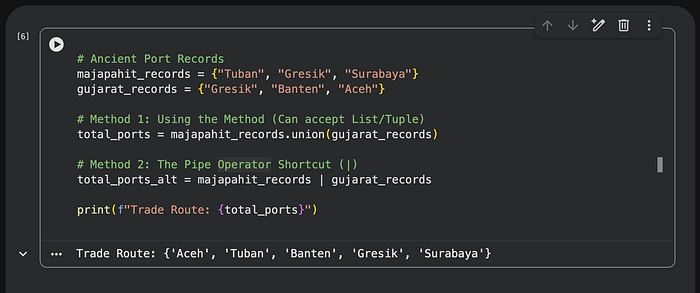
There is a tiny detail that separates working code from a syntax error. The pipe operator | only works if both sides are Sets. However, the .union() method is more flexible. It can accept a List or Tuple and automatically convert it into a Set result.
And if you want to update the original data without creating a new variable, use the .update() method. It does not generate a new set but injects new data into the existing container.
2. The Common Ground (Intersection)
In sociology, we often look for similarities between groups. What cultural values are shared by Generation X and Generation Z?
In Python, this is called Intersection. Do not use a loop to match data. Use mathematical logic. This method only keeps items that are "present" on both sides.
# Cultural Values
gen_x_values = {"Hard Work", "Family", "Stability"}
gen_z_values = {"Mental Health", "Family", "Flexibility"}

# Finding Common Values
shared_values = gen_x_values.intersection(gen_z_values)

# Or use the "AND" symbol (&)
shared_values_alt = gen_x_values & gen_z_values

print(f"Cross-Generational Issue: {shared_values}")
Just like a sql join, you can use the & symbol as a shortcut. It makes your code read like an English sentence.
3. The Exclusive Filter (Difference)
What if we want to know what is different? For example in nature conservation, you want to see animal species that exist only in the Borneo Rainforest but not in the Sumatra Rainforest.
We use Difference. This is set subtraction. It takes items from the first set and discards any item that also appears in the second set.
# Animal Species
borneo_forest = {"Orangutan", "Proboscis Monkey", "Clouded Leopard"}
sumatra_forest = {"Orangutan", "Tiger", "Elephant"}

# What is UNIQUE to Borneo?
borneo_endemic = borneo_forest.difference(sumatra_forest)

# Or use the Minus symbol (-)
borneo_endemic_alt = borneo_forest - sumatra_forest

print(f"Borneo Endemic: {borneo_endemic}")
Notice that "Orangutan" disappears because it belongs to both forests. The - symbol gives us an elegant way to filter data without writing if not in logic.
4. The Change Detector (Symmetric Difference)
This is my favorite feature. Symmetric Difference is the opposite of intersection. It keeps all items from both sets, except the duplicates.
Imagine you are comparing the guest list for a morning VIP session and an afternoon session. You do not care who stayed all day. You only want to know who came only in the morning or only in the afternoon. You want to find the "outliers".
Use the caret symbol ^.
# Invited Guests
morning_session = {"Ben", "Sarah", "Dan"}
afternoon_session = {"Dan", "Rachel", "Joe"}

# Who attended only ONE session?
unique_guests = morning_session.symmetric_difference(afternoon_session)

# Operator Shortcut
unique_guests_alt = morning_session ^ afternoon_session

print(f"Non-Continuing Guests: {unique_guests}")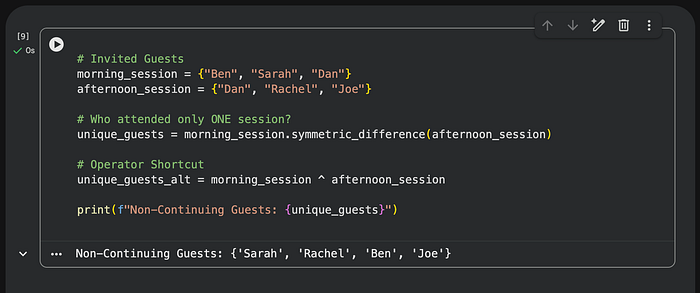
5. The Boolean Trap
Before we close a script, there is one important warning in the documentation.
In sets in python, the value True and the number 1 are considered the same identity. The same applies to False and 0.
If you have social survey data where respondents can choose "Agree" (True) or give a priority score (1), your data might get corrupted.
# Mixed Survey Data
# User A chose True, User B gave score 1, User C chose "Abstain"
survey_data = {True, "Abstain", 1}

print(survey_data)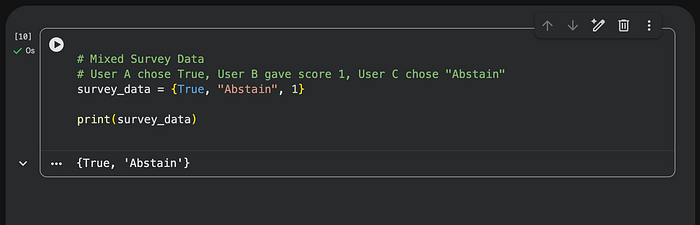
Python thinks True and 1 are duplicates, so one of them will be deleted automatically. Be careful when mixing boolean and integer data types in your set operations.
Why Should You Care?
Efficiency is not always about speed.
Use explicit Loops when you need complex condition checking per item.
Use standard Lists when the order of data is absolute.
But for the vast majority of cases where you simply need to compare distinct groups of data,
stop writing boilerplate.
Leave the habit of creating nested loops that bloat your memory. Start writing expressions that define your intent with absolute clarity.
Clean code is not just about aesthetics.
It is about respect for the mental energy of the person reading it.
. . .