

Every spring, when Apple drops a .5 update, I do the same (embarrassing) thing — I assume it's a security patch with a fresh wallpaper bolted on, and I almost don't bother.
iOS 26.5 dropped on May 11, I updated this weekend, and — surprise — there are a lot of things in here worth caring about.
Here are the 11 you'll actually feel.
TABLE OF CONTENTS
1 - End-to-End Encrypted RCS Messages
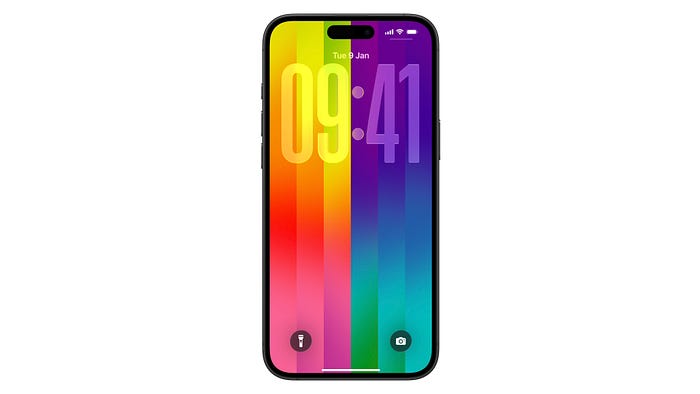
2 - The Pride Luminance Wallpaper
3 - Apple Maps Now Suggests Places Before You Even Search
4 - Heads-Up - Ads Are Coming to Apple Maps
5 - Magic Keyboard, Trackpad and Mouse - Plug In Once, Stay Paired Forever
6 - (EU Only) Third-Party Watches & Earbuds Finally Get AirPods/Apple-Watch-Tier Integration
7 - Move to Android - Pick How Much Message History Comes With You
8 - Reminders Snooze Now Shows the Exact Time - Finally
9 - App Store - Monthly Subscriptions With a 12-Month Commitment
10 - Inuktitut Keyboard
11 - 50+ Security Fixes
#1. End-to-End Encrypted RCS Messages
Your Android texts finally get iMessage-grade security. This is THE headline!
For years, the green-bubble conversation has always been unencrypted (deliberately?) — anything you sent to an Android friend was basically a postcard to attackers.
iOS 26.5 fixes that.
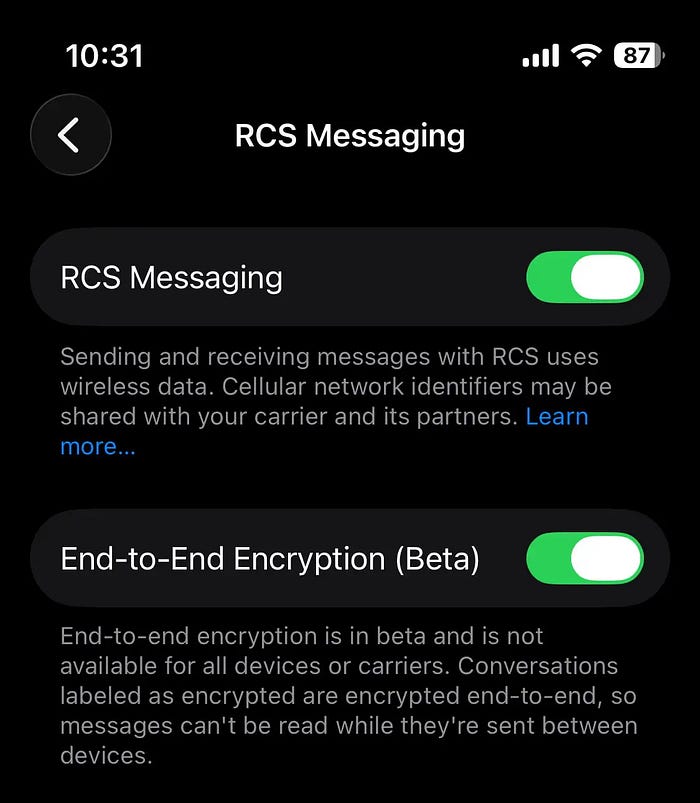
RCS messages between iPhone and Android now support end-to-end encryption, and it's ON by default.
The cynic in me waited five years for this. The realist in me knows that "encryption on by default" is the only kind of encryption that actually protects normal people. Toggles buried in menus protect only power users, right?
Apple shipped it as the default. That's the part that matters.
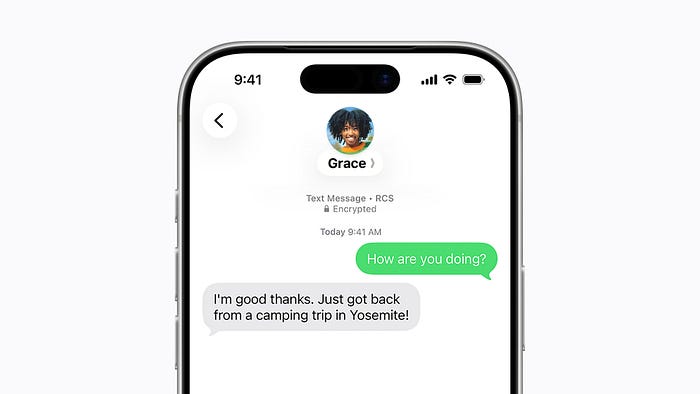
Open a thread with an Android contact on a supported carrier, and you'll see a small lock icon at the top of the conversation — that's your cue that the texts in there are now encrypted in the same way iMessages have always been.
Now, the rollout is gradual tho.
It depends on both carriers (yours and theirs) supporting the standard, and it's officially still a beta.
If you want to turn the feature off, which I cannot imagine a reason for — head to Settings ⚙️ < Apps < Messages 💬R &t; RCS Messaging.
#2. The Pride Luminance Wallpaper
Apple has been shipping a fresh Pride wallpaper every year for ages now — but the 2026 one, called Pride Luminance, is the first one I've actually wanted to keep on my Lock Screen for more than an afternoon.
PREVIOUS PRIDE WALLPAPERS
• iOS 16.5 (2023): Pride Celebration
• iOS 17.5 (2024): Pride Radiance
• iOS 18.5 (2025): Pride Harmony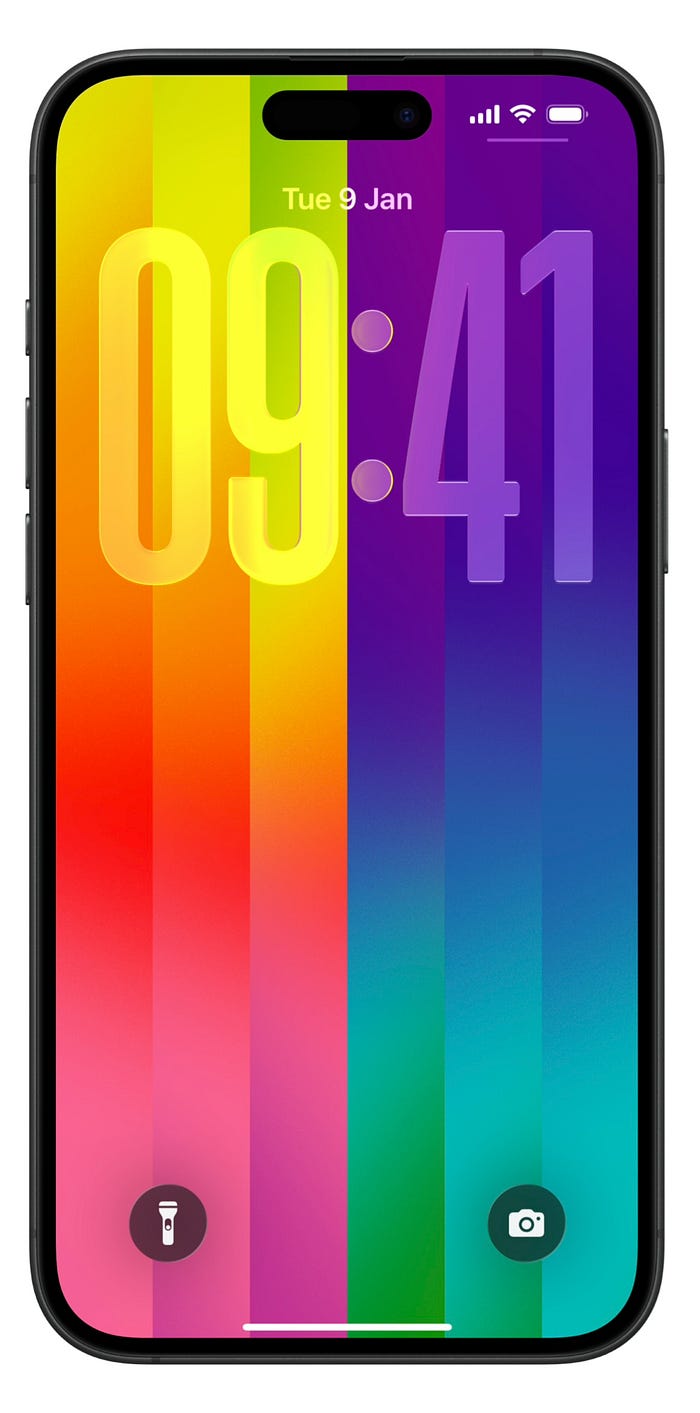
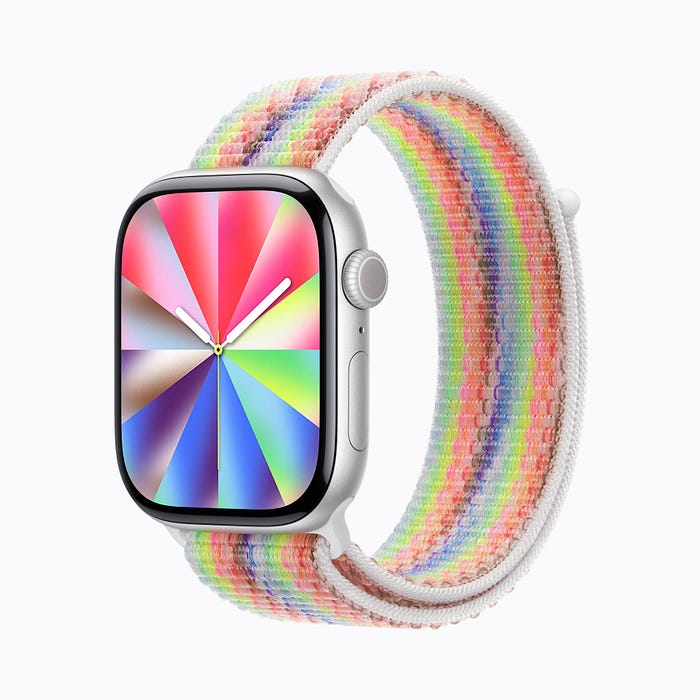
It's a dynamic wallpaper that refracts colors as you move the device or unlock the phone.
The shapes shift, the light bends, and the whole thing feels less like a static graphic and more like one of those tiny museum installations where you can't tell if the art is moving or you are.
There are up to 12 different color palettes you can pick from, so even if rainbow-out-of-the-box isn't your aesthetic, you can dial it down to a deeper, quieter combination.
To grab it: Settings ⚙️ < Wallpaper ❅ < Add New Wallpaper ➕ < Pride 🏳️🌈.
Watch faces matter too — if you've got an Apple Watch on watchOS 26.5, there's a matching Pride Luminance face that pairs with it. I'm not usually a "matchy" person, but the way they shift together when you raise your wrist is — fine, I'll admit it — kind of magical.
It's a small thing. But Lock Screens are the thing you look at 80 times a day, and small things you look at 80 times a day add up.
#3. Apple Maps Now Suggests Places Before You Even Search
Open Maps in iOS 26.5, pull up the bottom sheet on the home screen, and you'll notice something new — a "Suggested" carousel that surfaces places before you ask for them.
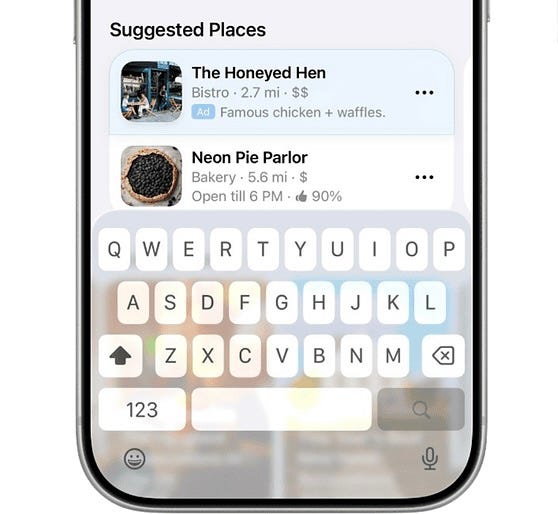
It's pulling from two signals:
- your recent searches (so if you've been searching for ramen lately, prepare for ramen recommendations)
- and what's trending nearby — meaning the places other people are searching for and visiting in your immediate area.
It's basically a "what's the vibe around me right now" feed, and it's better than Maps has any right to be.
I tested it walking around the neighborhood last weekend. Half the recommendations were spots I already knew about and the other half were places I'd been meaning to try but had completely forgotten the names of. Maps quietly reminded me. That's the whole job.
Now, Google Maps has had something like this for years, and Apple is late, as always.
But Apple's version is doing the privacy-first dance: the suggestions are computed in a way that doesn't link the recommendations to your identity, and there's no audience targeting going on.
Late, but the right kind of late.
#4. Heads-Up — Ads Are Coming to Apple Maps
Sadly, yes — this one is the price you pay for #3.
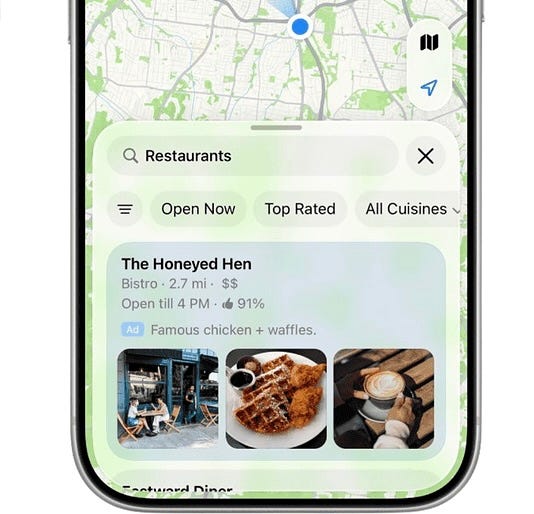
iOS 26.5 ships the disclosure copy and the technical groundwork for sponsored placements inside Maps search results.
The ads themselves aren't live yet, but the small print is.
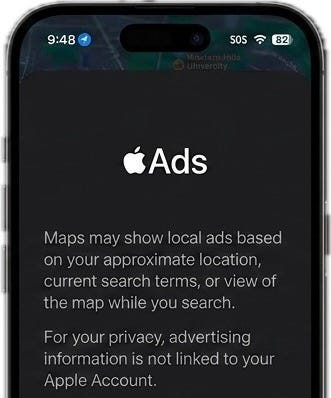
If you search for something now and scroll, you'll start to see language like "Maps may show local ads based on your approximate location, current search terms, or view of the map."
This is the part where I'm supposed to either freak out or shrug. I'm going to do neither.
Apple's claim is that the ads won't be linked to users and advertisers won't be able to target specific audiences — which, if true, is a meaningfully better deal than what you get from every other ad-laden map app on the planet. If false, well, we'll find out together.
What you should actually do: know it's coming, watch the first few weeks of how it lands once it goes live, and if a "Sponsored" pin starts showing up in your search results above the place you were actually trying to find, that's your cue to be loud about it.
#5. Magic Keyboard, Trackpad and Mouse — Plug In Once, Stay Paired Forever
This is the small one that I think will save the most hours, especially if you've got an iPad you actually try to do work on.
- Before iOS 26.5: pairing a Magic Keyboard, Magic Trackpad or Magic Mouse to an iPhone or iPad was a Bluetooth-menu adventure — toggle, search, click, hope, retry.
- After iOS 26.5: plug the accessory into your iPhone or iPad via USB-C, and that's it. Done. It pairs over Bluetooth automatically, and… stays paired even when you unplug the cable.
It's the kind of feature that sounds like nothing in a changelog and saves you four minutes the next twenty times you grab a coffee-shop iPad setup. Four minutes times twenty is over an hour of pure pointless menu-tapping reclaimed.
For iPad users especially, this is huge. The iPad is finally inching closer to "just works" territory with external accessories, and every one of these tiny removals of friction is the difference between using your iPad as a laptop and using it as a glorified Netflix tablet.
#6. (EU Only) Third-Party Watches & Earbuds Finally Get AirPods/Apple-Watch-Tier Integration
Heads up — this one is EU only. If you're not on an EU Apple Account, scroll on (else, you'll envy). If you are: this is, depending on what you wear on your wrist, possibly the biggest item in the whole update.
Under the Digital Markets Act, Apple is now letting third-party wearables hook into the iPhone at a level previously reserved for AirPods and Apple Watch.
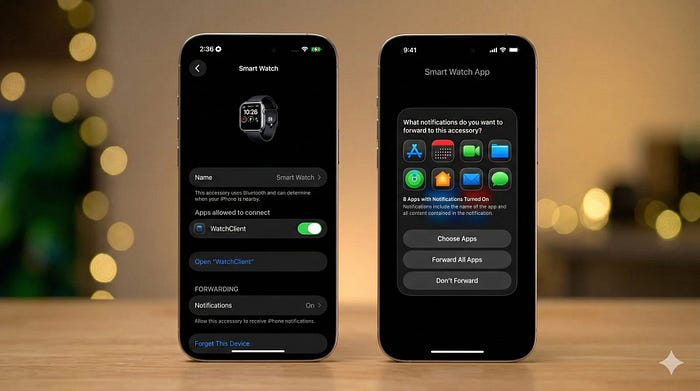
That means:
- Proximity pairing — open the case of a Sony or Pixel Buds, and you'll get the same one-tap pop-up you've always gotten with AirPods.
- Full notification content on the watch face — including images, not just a stripped-down preview.
- Reply from your wrist — Garmin, Fitbit, whatever you're wearing can now send replies back to the iPhone without picking up the phone.
- Live Activities — they mirror to third-party watches now, too.
Look — if you've been a Garmin user with an iPhone, you've always been a second-class citizen in Apple's eyes.
iOS 26.5 closes a lot of that gap, at least if you live in the right zip code. The rest of us get to wait for either regulatory action elsewhere or Apple deciding that the EU experiment didn't actually break anything.
#7. Move to Android — Pick How Much Message History Comes With You
I am not switching to Android. I am almost certainly never switching to Android. And yet — this feature is one of the most quietly interesting things in iOS 26.5, because of what it reveals.
Apple's "Move to Android" flow has existed for a while, but iOS 26.5 adds a granular picker for message attachments: when you migrate, you can now choose to bring All of your message attachments, 1 year, 30 days, or None.
Why does this matter even if you're staying put? Because it's the clearest signal yet of exactly what Apple is willing to hand over from your message history when you walk.
The "All" option, in particular, tells you something — Apple's not playing the iMessage-jail game anymore. The platform is genuinely more portable than it was a year ago.
To see the picker without committing to anything dramatic: Settings ⚙️ < General ⚙️ < Transfer or Reset iPhone → Transfer to Android. Screenshot the picker, then back the hell out before you tap anything that says "erase." (I'm not lying — I almost did.)
#8. Reminders Snooze Now Shows the Exact Time — Finally
I'm a Reminders power user. I have lists for lists. And one of the tiniest, dumbest, most paper-cut-grade annoyances in iOS for years has been the snooze options on a timed Reminder notification.
You'd long-press a notification, hit snooze, and get options like "Later Today" or "This Evening" — totally vague.
"Later Today" at 9 AM means one thing, "Later Today" at 4 PM means something completely different, and you had no idea when the thing was actually coming back.
iOS 26.5 just shows you the time. Snooze options now display the precise return time — "9:00 PM", "Tomorrow 7:00 AM" — instead of the vague mood-board labels. That's it. That's the change.
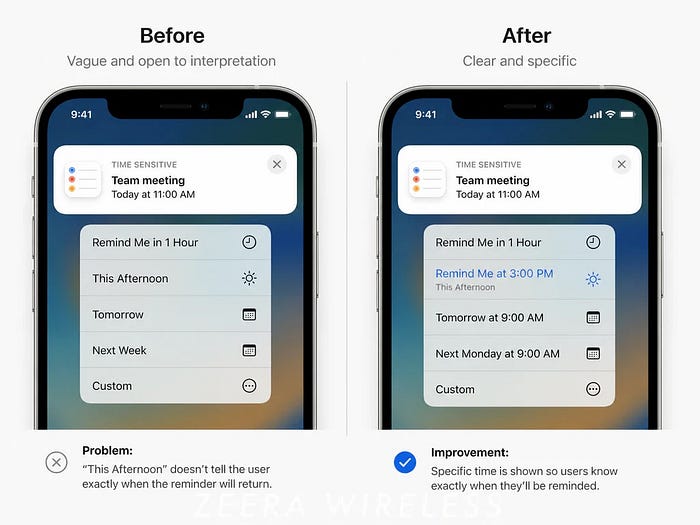
It's not headline material. It will not show up in any keynote slide. But if you've ever snoozed a reminder, looked at it three hours later, and thought "wait, when is this coming back," you're going to feel this every single day for the rest of the year.
The best UX wins are the ones where you stop having a feeling and you can't quite place when it stopped.
#9. App Store — Monthly Subscriptions With a 12-Month Commitment
This one is for developers in the spec, but for you owning the wallet — it's worth a paragraph.
iOS 26.5 unlocks a new billing model in the App Store: developers can now offer a monthly subscription with a 12-month commitment.
You pay a lower monthly price, but you're locked in for a year. Cancel any time after the commitment lapses, but not during it. It's available globally with two exceptions — the US and Singapore.
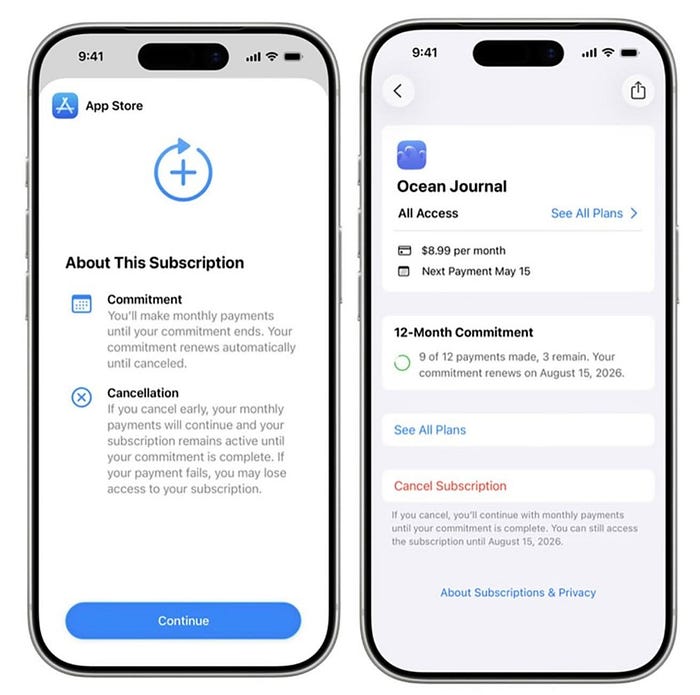
From the reader side, what this means is simple: starting now, "$X / month" in an in-app subscription page may or may not actually mean "you can cancel next month." Read the fine print on your next sub.
If you see "12-month commitment," that's the new model — and it's a perfectly fine deal if the app is one you know you'll use for a year, and a terrible deal if it's one you'll forget about in three weeks.
Apple has been chasing the annual-plan psychology for ages with bigger upfront discounts. This is the cleaner version of that — smaller monthly bite, locked-in calendar.
#10. Inuktitut Keyboard
iOS 26.5 adds a new keyboard layout for Inuktitut — the language spoken across Nunavut and the Inuvialuit Settlement Region in northern Canada.
You'll find it under Settings ⚙️ < General ⚙️ < Keyboard ⌨️ < Keyboards < Add New Keyboard < Inuktitut.
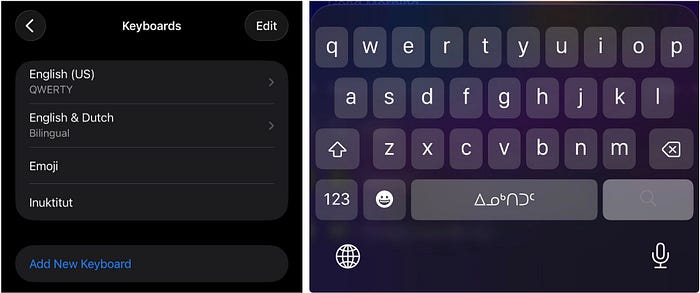
For most readers of this post, this is a footnote. For Inuit communities — many of whom rely on the iPhone as their primary computing device, and many of whom have been typing in Inuktitut on jury-rigged third-party keyboards for years — this is the kind of small, quiet, "of course" thing that Apple ships every couple of years and that genuinely changes how a few hundred thousand people use their phones.
I include it here because the writers who never mention these features are the writers who pretend "tech for everyone" only means "tech for the loudest ten percent." It doesn't. Apple shipped it. Good.
#11. 50+ Security Fixes
If none of the above moved the needle, this one should.
iOS 26.5 patches more than 50 security vulnerabilities — the full list is on Apple's security page, and it includes the usual lineup of WebKit, Kernel, and miscellaneous-component fixes.
None of them are reported as being actively exploited in the wild at the time of release, but with a patch list that long, the odds that one of them shows up in a real-world exploit chain in the next few weeks are not zero.
Updating fixes them. Not updating doesn't. This part isn't complicated.
That's all for now.
The spring .5 is the update everyone tells themselves they'll install "later." Don't be that person. Install it tonight, set the Pride Luminance wallpaper as a small treat, and then go check your Reminders snooze the next time it fires — you'll grin.
Isn't iOS 26 awesome?
145+ new features of iOS 26: A Compilation (Always Updated)
Finally,
If you love exploring new iOS & Mac apps (like me), consider subscribing to Setapp. You'll get access to a curated collection of 240+ amazing apps for just $9.99 a month, which rather cost hundreds of dollars if purchased individually.
- Use my affiliate link to start your Setapp journey! (It's free for 30 days)
- Get my free list of 100+ Ultimate macOS Apps on Setapp here.