


A comprehensive guide to the CLAUDE.md file in Claude Code, including how it is loaded, how to write it, best practices, and how it compares with similar files in other AI coding tools
If you draw a timeline of how AI coding tools have evolved in recent years, Claude Code is probably one of the points that deserves its own marker. Anthropic first brought it to developers in February 2025, when it was still in an early public preview, and by May 2025, it had started reaching a much broader developer audience. What made it unusual was not that it added yet another model interface for chatting, but that it was the first time an AI agent truly moved into the terminal, reading repositories, editing files, running commands, fixing problems, and pushing tasks forward. From that moment on, the center of software development had already started to shift quietly. For a long time, the main job of developers was manual implementation, while IDEs mostly served as assistants for code completion, search, and analysis. Claude Code pushed that boundary much further. More and more often, we no longer start by thinking about what the next line of code should be, but about what the goal is, what the constraints are, which files can be changed, and what result counts as done. The development process is moving from writing code line by line by hand to driving implementation through clear intent and AI collaboration. This is not a small feature upgrade, but a real reordering of how work gets done, and that is why it was the first time many developers truly felt the impact of AI being able to complete programming tasks autonomously.
That is exactly why I want to write a series about how to actually use Claude Code well. There are already many good articles online, and the official documentation is absolutely worth reading, but I still want to write this series. One reason is that Claude Code moves so quickly that a lot of older experience goes stale fast. Another is that I want to organize what I have learned from real usage, including the pitfalls I have run into and the changes in how I think about it. Writing things down is also a good way to rebuild my own learning path and make my understanding of Claude Code more solid. As the first article in this series, I want to start with CLAUDE.md, because it is the entry point for how Claude Code understands a project. It provides the background and conventions the AI needs, and it often has a direct impact on how accurately and reliably the model works inside your codebase.
What Is CLAUDE.md
CLAUDE.md is a Markdown file that Claude Code automatically reads at the beginning of each session. In this file, you can write instructions, rules, and preferences, and Claude Code will follow them throughout the rest of the interaction.
Someone online once shared a funny meme based on a comparison photo from the shooting event at the 2024 Paris Olympics. It joked that Claude Code users fall into two groups: on the left, a contestant fully geared up and frantically installing all kinds of plugins; on the right, the Turkish sharpshooter standing calmly with one hand in his pocket, relying on nothing but a single CLAUDE.md:

Even though it is just a joke, it points to something real: instead of spending your time fiddling with flashy plugin setups, you are often better off spending that time writing a good CLAUDE.md. Users who put real effort into it often get a much better experience than expected, because CLAUDE.md fundamentally changes how the AI interacts with your project.
Here is a useful analogy: if you think of Claude Code as a new developer joining your team, then CLAUDE.md is the onboarding handbook for your project. Without that handbook, the new teammate has to keep asking basic questions again and again: How do we build this project? Which test framework do we use? What code style do we follow? With the handbook in place, they can start working efficiently from day one in the way your team expects.
The core value of CLAUDE.md: it turns Claude Code from a general-purpose AI assistant into a development tool tailored to your project.
How CLAUDE.md Is Loaded
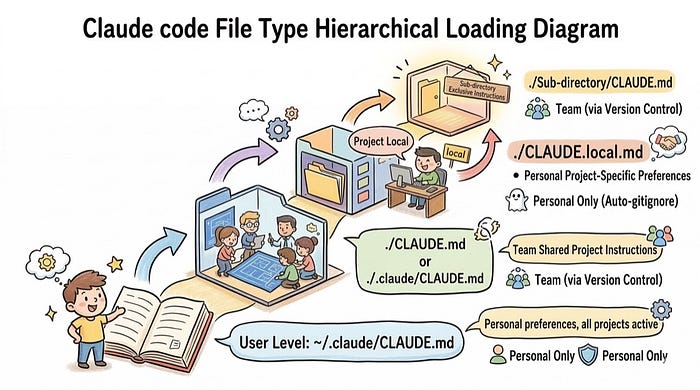
When many people first encounter CLAUDE.md, they assume it is just a Markdown file in the project root. In reality, that is not how it works. Claude Code reads memory and instructions through a layered loading model. CLAUDE.md files in different locations apply to different scopes. Some affect all of your projects, some only affect the current repository, and some only take effect inside a specific subdirectory.
This is also why people often get confused in practice. Why does the same rule work in project A but get overridden in project B? Why did you clearly write a rule, but Claude Code still ignored it in a certain directory? In the end, these questions all come back to how CLAUDE.md is loaded.
File Hierarchy
Let us start with the core file types:
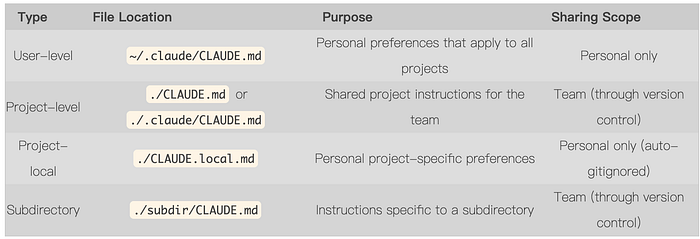
In daily use, the most common one is usually the project-level ./CLAUDE.md, because it is shared through version control and defines Claude Code's default behavior inside that repository. ~/.claude/CLAUDE.md is more like your global personal preference file, while CLAUDE.local.md is useful for notes you do not want to commit but still want to apply in the current project.
Some teams also split rules into a .claude/rules/ directory for more modular organization, but that is already a more advanced setup. In this article, I will stay focused on CLAUDE.md itself.
Loading Rules
When Claude Code reads these files, it roughly follows these rules:
- When Claude Code starts, it first reads the
CLAUDE.mdfiles relevant to the current working directory - The user-level
~/.claude/CLAUDE.mdis also included as a higher-level default preference layer CLAUDE.mdfiles inside subdirectories are not all loaded up front, but only when Claude Code actually reads content from those directories- When multiple
CLAUDE.mdfiles are active at the same time, a nearest-scope rule usually applies, meaning instructions closer to the current task and narrower in scope take priority - Within the same layer, rules that are more explicit and more specific are also more likely to be followed consistently than vague general statements
Conflict Resolution
When different CLAUDE.md files conflict with each other, the easiest rule to understand is the nearest-scope principle. The closer a rule is to the current task, and the narrower the scope it applies to, the higher its priority usually is. For example, if your user-level CLAUDE.md says use 4-space indentation, but the project root CLAUDE.md clearly says use 2-space indentation, then Claude Code will follow 2-space indentation inside that project.
This matters because it is not enough to know that multiple CLAUDE.md files can exist. You also need to understand what scope each one applies to and which one overrides which when conflicts happen.
How to Write CLAUDE.md
Start Quickly with /init
The easiest way to get started is to run Claude Code's /init command in the project root and let it generate a first draft for you:
$ claude
> /init
/init looks at your tech stack, directory structure, and common commands, then generates a CLAUDE.md file to give you a basic starting skeleton. But that only solves the problem of how to start from a blank file. It does not mean you already have a CLAUDE.md that truly fits your project.
Once you get that draft, you will usually need at least one round of editing. The reason is simple: /init tends to produce content that is broad and comprehensive. It tries to include everything it can detect, but some of that information is not actually important for your project, and some of it may be correct without being useful enough to guide Claude Code effectively. CLAUDE.md is not better just because it is longer. On one hand, it takes up context window space. On the other hand, once the information becomes too scattered and generic, Claude Code has a harder time identifying the constraints that really matter. A better approach is to first delete low-value, generic, or redundant information that is already documented elsewhere, and then add the project knowledge that only your team knows, especially the details that are most likely to cause Claude Code to make mistakes.
When Writing for the First Time, Start with the Most Useful Information
When you write CLAUDE.md for the first time, you do not need to aim for completeness right away. What matters more is to start with the information that most directly affects Claude Code's performance. In other words, prioritize the things that are easy to get wrong if missing, not the things that merely make the file look complete.
The most valuable information to add first usually falls into a few categories:
- Common commands: build, test, lint, and local development commands, so Claude Code does not have to guess every time
- Project-specific constraints and pitfalls: which directories must not be edited, which tables use soft deletes, which interfaces must go through specific middleware
- The basic workflow: branch naming, pre-commit checks, and the baseline PR requirements
- Essential architecture context: what each directory in a monorepo is responsible for, and which modules should not cross certain layering boundaries
If a piece of information does not help Claude Code understand the project faster and does not reduce common mistakes, then there is no reason to rush it into the file. The value of CLAUDE.md is not that it covers everything. Its value is that it clearly communicates the most important project facts and collaboration constraints.
As the File Grows, Split It with @imports
As projects become more complex and rules keep growing, do not keep cramming everything into a single file. At that point, you can use @imports to move more detailed guidance into separate files and reference them from the main CLAUDE.md.
# Project Instructions

See @README.md for project overview.
See @package.json for available commands and scripts.
See @docs/testing.md for testing conventions.
See @docs/api-guidelines.md for API design rules.
The advantage is that the main file can continue to hold the information that is most frequently needed and should be seen first, while more detailed standards, workflows, and conventions can be maintained separately. As for how far you should modularize and which content is worth splitting out, I will cover that later in the best practices section.
How CLAUDE.md Evolves
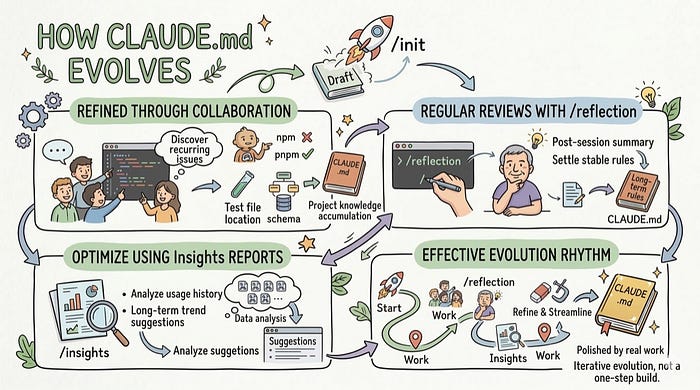
CLAUDE.md is not the kind of file you write once and never touch again. It is more like an evolving memory of the project. The parts that become truly valuable are usually not the things you invent in a single sitting, but the things you refine gradually through repeated collaboration, corrections, and retrospectives.
Improve It Continuously Through Collaboration Issues
Of course, you can start from a draft generated by /init, but what should be added later to CLAUDE.md usually does not come from imagination. It comes from repeatedly discovering concrete collaboration problems in daily work. It should not depend on one person occasionally adding random notes. It should become the place where the whole team continuously records and preserves project experience.
These problems are often very specific:
- Claude Code keeps using
npminstead ofpnpm? Add a rule - Claude Code keeps putting generated test files in the wrong directory? Document the correct test file placement rule
- Claude Code edits the DB schema file but forgets to rebuild the underlying module? Write down the dependency relationship and the required build step clearly
Every time you have to manually correct Claude Code, that is actually a strong signal that some piece of project knowledge has not been written into CLAUDE.md yet. If the same correction has already happened two or three times across the team, that is usually enough to say the rule should be turned into shared, long-term memory.
Use /reflection for Regular Retrospectives
The previous approach still depends on people noticing problems during usage and then remembering to update the rules. The value of /reflection is that it turns this into a repeatable wrap-up step. At the end of each session, you can ask Claude Code to summarize what from that round of collaboration is worth adding to CLAUDE.md, and then turn those points into more stable project rules.
Strictly speaking, /reflection is not some mysterious built-in capability. It is essentially just a prompt, packaged as a command that can be called repeatedly. If you want to see its original content, you can look directly at this reflection gist.
The core idea of that prompt is to make Claude Code look back on the session that just ended and judge which lessons have become stable enough to be turned from chat-specific context into lasting rules inside CLAUDE.md. After the user confirms them, Claude Code updates CLAUDE.md and does not modify any other files.
The setup is also simple. Anthropic's official documentation mentions that Markdown files placed under ~/.claude/commands/ automatically become user-level commands, and the filename becomes the command name. So you can save that prompt as:
~/.claude/commands/reflection.mdThen run this directly inside Claude Code:
/reflectionClaude Code will review the session according to that prompt and update CLAUDE.md with the confirmed rules. This turns the evolution of CLAUDE.md from something people remember to do occasionally into a stable step that can happen after every session.
Use Insights Reports to Optimize It
Compared with the previous two approaches, which are both tied more closely to individual collaboration sessions, Insights lets you zoom out and look across a longer period of usage. That makes it easier to see which problems keep recurring, which habits have become stable, and which information is worth formally adding to CLAUDE.md.
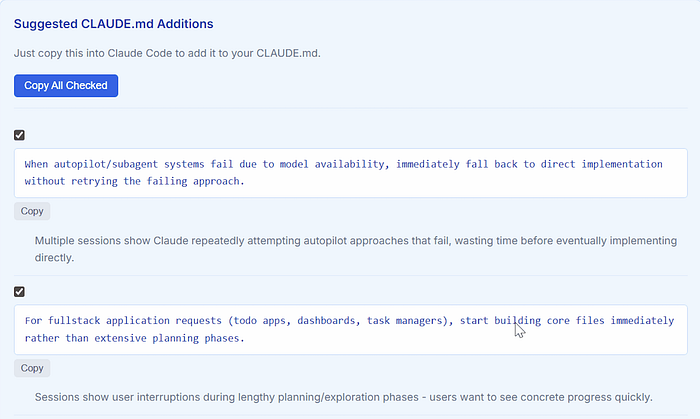
Insights is an analysis command introduced in Claude Code v2.1.x. It is mainly used to analyze your Claude Code usage history and generate a report. Part of that report includes direct suggestions for how to improve CLAUDE.md, and that makes it an especially important path for continuous evolution.
Using it is straightforward. Once you are inside Claude Code, run the /insights command. After it finishes, you can find the generated HTML report in the ~/.claude/usage-data directory, where you can review your usage patterns over time and the related recommendations.
For example, you may notice that you often remind Claude Code to use a certain set of test commands, often tell it not to touch some generated directories, or often repeat the same kind of background information for the same class of tasks. If those things have shown up consistently across multiple sessions, then they probably should not stay buried in chat history. They should be promoted into CLAUDE.md.
From that perspective, the Insights report is best understood as a tool for helping CLAUDE.md keep evolving. The modification suggestions it provides are especially useful for deciding which content is mature enough to be formally recorded.
A More Effective Rhythm for Evolution
If you connect all of the methods above, a natural evolution rhythm usually looks like this:
- Start with
/initand get a usable first draft quickly - Record issues from daily collaboration and write repeated corrections back into CLAUDE.md
- Run
/reflectionat the end of each session and turn session-specific lessons into project rules - Review
Insightsreports periodically to identify repeated patterns over longer time spans - Keep pruning and tightening the file by removing outdated, redundant, or low-value rules
CLAUDE.md that evolves in this way is usually much more useful than a version that tried to be exhaustive from day one, because it is not designed in the abstract. It is refined step by step from real collaboration.
Best Practices for CLAUDE.md
Many people assume CLAUDE.md is not taking effect because it was not loaded, but in real usage a more common situation is that Claude Code did see the file, yet judged that much of its content was not very relevant to the current task and therefore did not rely on it in a meaningful way. In other words, the real problem is often not just the loading mechanism, but whether what you wrote is relevant enough, specific enough, and valuable enough to keep long term. So in this section, I want to focus less on how to keep adding more rules and more on how to judge what is worth keeping.
Keep It Concise and Prioritize High-Value Information
CLAUDE.md is essentially extra context for Claude Code. That means the longer it gets, the more context it consumes, and the less space remains for the actual task. More importantly, when the file becomes too cluttered, the model is more likely to treat it as low-relevance background material.
That is why the content most worth keeping in the main file is usually a short list: high-frequency commands, core project constraints, historical lessons that are easy to trip over, and the background information that is likely to matter every time someone enters the repository. As for content that only applies in rare situations, or statements that sound nice but have no clear execution path, it is better to leave them out than to stuff them in just to make the file look comprehensive.
Be Specific So Rules Are Actually Executable
Many CLAUDE.md files look complete on the surface, but do not help much in practice, because a lot of their statements point in the right direction without offering concrete guidance for real tasks. Phrases like pay attention to code quality, follow project conventions, or understand the context before making changes sound fine, but they barely help Claude Code make better decisions in a specific situation.
What actually helps is writing things at a level that can be followed directly: which command should be used for tests, which directories must not be edited, whether lint must be run before committing, which directory the API layer belongs in, and in what situations tests must be added. The more concrete you are, the easier it is for Claude Code to understand what you really want during day-to-day work.
Communicate Intent, Not Just a List of Rules
A good CLAUDE.md does not merely list rules. More importantly, it helps Claude Code understand the intent behind them, because many real tasks will not land neatly on the edge of a rule checklist. Only when it understands why the team designed something a certain way and why a constraint exists can it make decisions in new situations that are closer to what you expect.
For example, if you only write do not modify files under src/generated/, that is still a rule. But if you go one step further and explain that those files are generated automatically from an OpenAPI schema, and that the real source of truth is the schema and generation workflow rather than the generated output, then Claude Code can understand why that restriction exists and is much more likely to modify the right thing the next time a related task comes up.
Use Progressive Disclosure and Keep the Main File Disciplined
Not all information belongs in the root CLAUDE.md. A better approach is usually to keep the most common, stable, cross-task information in the main file first, and once the content grows, split it using @imports or multiple CLAUDE.md files at different directory levels. The former improves structure and maintainability, while the latter makes certain local rules apply only when Claude Code actually enters the relevant directory.
The benefit is not just a cleaner-looking file. More importantly, it reduces the amount of irrelevant information dumped into context at the beginning of every session. Keep the main file disciplined, and let details expand only when needed. That is how CLAUDE.md starts to feel like a thoughtful collaboration guide rather than an ever-growing pile of project trivia.
There is one more thing worth emphasizing: never put API keys, passwords, tokens, or any other secrets in CLAUDE.md, because it often goes into version control. The moment you write credentials there, you are effectively exposing them to anyone who can access the repository.
Files Similar to CLAUDE.md
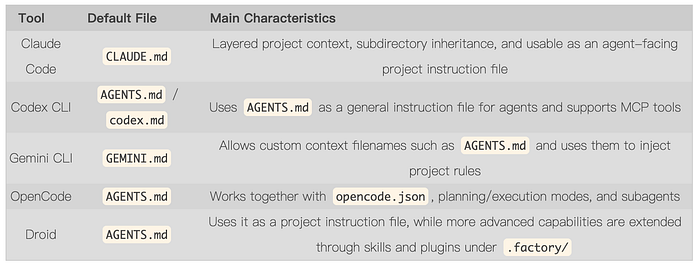
Among AI coding tools similar to Claude Code, most of them now have their own instruction file. But at this point, what is really worth comparing is not just the filename. The more important question is how each tool uses that file, and which capabilities it keeps outside the file itself.
Instruction File Comparison
It Is Not Just About the Name, the Mechanism Is Different Too
From the perspective of instruction system design, Claude Code and Gemini CLI are actually closer to each other. They both treat these files as persistent memory or context injected into the model. The difference is that Claude Code has a clearer hierarchy for CLAUDE.md, making it easier to combine multiple context files across a project. Gemini CLI can also read multiple GEMINI.md files from a project, but it more commonly concatenates them together in a simpler way, and it even allows you to rename the default file to AGENTS.md, which makes it more open in terms of ecosystem compatibility.
Codex, OpenCode, and Droid look more like a different branch of the same evolution. All three are converging on AGENTS.md, but what they share is not just a common filename. They also tend to treat it as a unified entry point, while moving more advanced capabilities outside the file itself. For Codex, the focus is on turning AGENTS.md into a reusable cross-tool instruction format. For OpenCode and Droid, the focus is more on expanding richer collaboration capabilities around AGENTS.md. In other words, on this path, AGENTS.md is more like a starting point than the whole system.
A Trend That Is Beginning to Form
What is really worth paying attention to is no longer the file itself, but how the instruction systems behind these tools are gradually converging. CLAUDE.md still represents a very recognizable memory design, especially in layered loading and project context management, where it still has clear strengths. At the same time, AGENTS.md is becoming an increasingly strong cross-tool format. By late 2025, OpenAI had already contributed AGENTS.md to the Agentic AI Foundation and explicitly described it as a simple, open, and interoperable standard. Gemini CLI, OpenCode, Droid, and others are also moving toward that convention to different degrees.
This means that in the future, switching between different AI coding agents will probably keep getting cheaper. But at the current stage, the filenames may be converging, while the capability models are still far from unified. Some tools emphasize layered memory, some emphasize agent orchestration, and some move skills, subagents, plugins, and organization-level configuration outside the instruction file. So the value of CLAUDE.md is not just the file itself, but the whole way it organizes project context behind the scenes.
Summary
This article started with what CLAUDE.md is, then walked through how it is loaded, how to write it, how it evolves, best practices, and how it relates to the instruction systems of similar tools. What really matters is understanding the broader pattern behind it: a way to organize project context, preserve collaboration constraints, and let AI agents participate in development more reliably.
In real usage, CLAUDE.md works best when you start from a usable version and then keep adding, pruning, and tightening it through real collaboration, instead of trying to write an all-encompassing document from day one. No matter how filenames and implementations evolve across tools in the future, the basic idea will remain valuable: turn project experience into long-term rules so AI can understand context more consistently. That is why CLAUDE.md is worth understanding seriously.
References
- How to Write a Good CLAUDE.md File
- Writing a good CLAUDE.md
- Understanding CLAUDE.md Loading in Large Monorepos
- Manage Claude's memory
- AGENTS.md
Follow me to keep learning the latest AI and software development technologies together. If you have questions or thoughts, feel free to leave a comment.