


🚀 High-Paying Tech Roles Are Open Right Now. Apply Quickly — The Faster You Move, The Better Your Chance To Get Selected. 👉R Aply & Secure Your Job
I've been running local LLMs for a while now. If you're anything like me, you know the feeling — you download a new model, hit "load," and watch your machine choke because it doesn't have enough RAM. It's frustrating, especially when you know you have a more powerful machine sitting somewhere else.
That's exactly the situation I was in. And then I got early access to LM Studio Link.
Let me tell you — this thing is a game-changer.
My Setup: Two Macs, One Problem
I have two Apple Silicon machines at home:
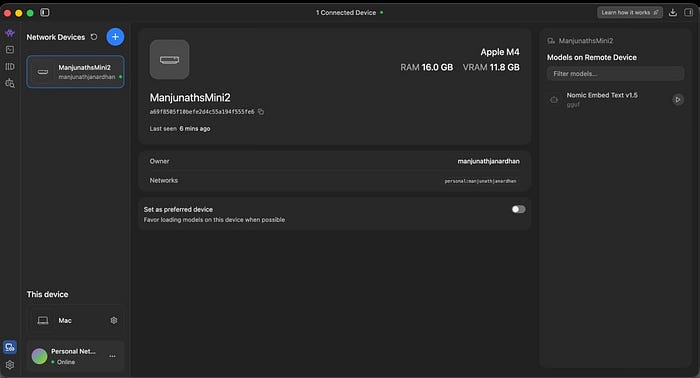
- Mac Mini M4–16GB RAM. My daily driver. Compact, quiet, always on.
- MacBook Pro M4 Max — 64GB RAM. The beast. But it's not always at my desk.
The Mini handles everyday tasks beautifully. But when it comes to running serious models like OpenAI's GPT-OSS 20B, Qwen 3.5 35B, or Llama 3 70B? Not a chance. These models need far more memory than 16GB can offer.
Meanwhile, my M4 Max laptop could comfortably run all of them. The problem was obvious — the computing power was on the wrong machine half the time.
I'd been thinking about setting up something with Ollama and SSH tunnels, maybe even a reverse proxy. Then LM Studio dropped Link, and suddenly, none of that hacking was necessary.
What Exactly Is LM Studio Link?
Think of it as your own private AI network.
LM Studio Link lets you connect multiple machines running LM Studio (or its headless counterpart llmster) into a secure mesh network. Once connected, you can load models on any remote device and use them from any other device — as if the model were running locally.
The key details that matter:
- End-to-end encrypted — built on top of Tailscale mesh VPNs using WireGuard protocol
- No ports exposed — your machines never touch the public internet
- Zero config — works behind firewalls, NAT, and corporate networks without manual port forwarding
- Identity-based access — no API keys to manage or rotate
- Runs entirely in userspace — doesn't modify any global system settings
It's the kind of setup that would have taken days of SSH config files, firewall rules, and Tailscale setup. LM Studio wraps it all into a couple of clicks.
Setting It Up: Surprisingly Painless
Here's what the actual setup looked like for me:
On the M4 Max (the host), I opened LM Studio, logged in to my account, and enabled Link. The machine appeared on my network within seconds. I clicked the Link button at the bottom, clicked the "Create your link " button, connected to my Google Account, selected "GUI is present on the machine," and followed the instructions on the other machine, in my case, a Mac Mini!
On the Mac Mini (the client): I logged in with the same account. Under "Network Devices," my M4 Max appeared as a connected device. I could see all the models available on it — GPT-OSS 20B ,Glm 4.7 Flash, Nemotron 3 Nano, Qwen3 Coder 30B, Gemma 3 27B Instruct, and a dozen more.
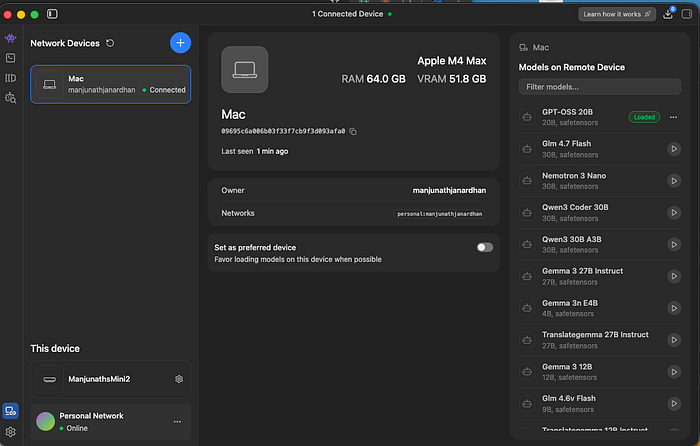
I clicked on GPT-OSS 20B, and it loaded. On my 16GB Mac Mini. Through an encrypted tunnel. Running inference on my M4 Max across the room.
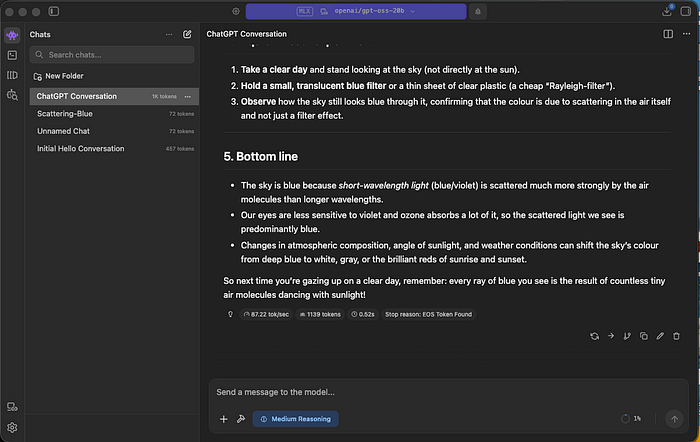
The first response came back, and I just sat there for a moment. It was fast. — 87 tokens per second. The chat felt no different from running a local model.
The "Aha" Moment
I asked the model a question about "why the sky is blue". What came back was a detailed, well-structured response with a practical experiment you could try at home. The response used 1,139 tokens and completed in about half a second.
That's when it hit me. I was running a 20-billion parameter model on a machine with 16GB of RAM. The chats were stored locally on my Mini. The inference was happening on my M4 Max. And the entire thing was encrypted end-to-end.
No cloud provider involved. No tokens are being counted against a billing meter. No data leaving my local network.
Why This Matters More Than You Think
If you're a developer, researcher, or anyone working with local AI, here's why Link deserves your attention:
You stop buying duplicate hardware. Instead of maxing out every machine, you invest in one powerhouse and share its compute across your devices. My Mac Mini doesn't need 64GB of RAM anymore.
Your existing tools just work. Any application pointing to localhost:1234 — whether that's Claude Code, OpenCode, Codex, or your own custom scripts — works with remote models without any code changes. LM Studio handles the routing transparently.
Privacy stays intact. This isn't a cloud relay. Your prompts and model weights travel directly between your devices over encrypted peer-to-peer connections. Neither Tailscale nor LM Studio's servers can see your data. Only device metadata for connection setup touches their backend.
No API key management headaches. If you've ever accidentally committed a .env file with API keys, you know the pain. Link uses identity-based authentication tied to your LM Studio account. There are no keys to leak.
The Practical Implications
I've been thinking about how this changes workflows, especially for people who work across multiple locations or machines:
The home office setup: Keep a GPU rig or high-memory Mac in one room, use lightweight laptops everywhere else. Your inference happens on the heavy machine regardless of where you're sitting.
Team scenarios: LM Studio Link is free for up to 2 users with 5 devices each — a total of 10 devices. A small team could share a single powerful inference server without any cloud costs.
Edge + power hybrid: Use a Raspberry Pi or a lightweight device as a thin client for AI tasks, with the heavy lifting handled on a remote workstation. I'm already thinking about trying this with my OpenClaw setup.
A Few Things to Keep in Mind
It's still in preview, and access is being rolled out in batches. I was lucky to get in early. A few observations from my testing:
- The connection is remarkably stable over the local network. I haven't tested it extensively across the internet yet (say, from a coffee shop back home), but the Tailscale backbone should handle that well.
- Model loading on the remote device still takes the usual time — you're not magically speeding up the initial load.
- If the host machine loses connection, you lose access to those models until it reconnects.
These are minor trade-offs for what you get in return.
The Bigger Picture
We're at an interesting inflection point in local AI. Models are getting smaller and more capable. Apple Silicon keeps pushing the memory bandwidth ceiling. And now tools like LM Studio Link are solving the distribution problem — making it easy to run the right model on the right hardware without any infrastructure overhead.
That's not just convenient. That's a fundamental shift in how we think about local AI infrastructure.
Getting Started
If you want to try LM Studio Link:
- Download LM Studio from lmstudio.ai
- Request access to Link at lmstudio.ai/link
- Install LM Studio on both your host (powerful machine) and client (lightweight machine)
- Log in with the same account on both, enable Link, and you're connected
It's free for personal use — up to 2 users with 5 devices each. Enterprise options are available if you need more.
Support
If you found this article informative and valuable, I'd greatly appreciate your support:
"Give it a few claps 👏 on Medium to help others discover this content (did you know you can clap up to 50 times?). Your claps will help spread the knowledge to more readers."
- Share it with your network of AI enthusiasts and professionals.
- Subscribe to my YouTube channel for AI videos explained in simple English: https://www.youtube.com/@AIBroEnglish
- Connect with me on LinkedIn: https://www.linkedin.com/in/manjunath-janardhan-54a5537/