

👉For Non-Members link to the full story
If you're building applications with LangChain or any Large Language Model (LLM), you've probably seen this problem where something breaks, your AI gives weird responses, or you have no idea why your chain isn't working as expected. This is where LangSmith comes in.
Think of LangSmith as your debugging and monitoring tool for LLM applications.
Just like how you use browser DevTools for web development, LangSmith helps you see exactly what's happening inside your AI applications.
What is LangSmith?
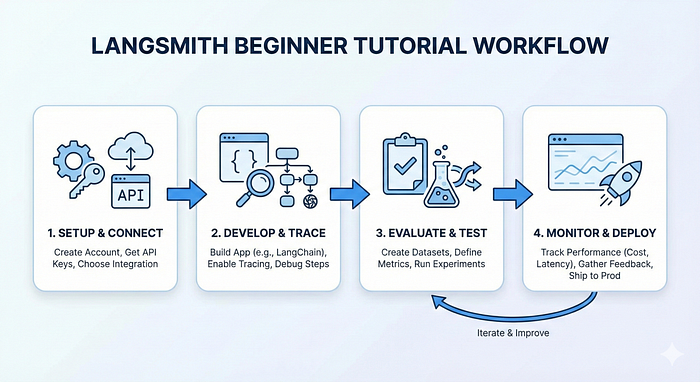
LangSmith is a platform built by the creators of LangChain for observability, testing, and monitoring of LLM applications. It works with any LLM framework, not just LangChain.
Features:
- Tracing: See every step your LLM application takes
- Debugging: Identify where things go wrong
- Testing: Create datasets and evaluate your app's performance
- Monitoring: Track your application in production
- Prompt Management: Version and manage your prompts
Why Do You Need LangSmith?
Let us imagine that you're building a chatbot that answers customer queries. Without LangSmith:
- A user complains about a wrong answer → You have no idea what happened
- Your app is slow → You don't know which component is the issue
With LangSmith, you can trace every interaction, see token usage, measure latency, and compare different versions of your prompts.
Setting Up LangSmith
Step 1: Get Your API Key
- Go to smith.langchain.com
- Sign up (free tier available)
- Go to Settings → Create API Key
- Copy your API key
Step 2: Install Required Packages
pip install langchain langsmith openai langchain-community faiss-cpuStep 3: Configure Environment Variables
import os

# LangSmith Configuration
os.environ["LANGCHAIN_TRACING_V2"] = "true"
os.environ["LANGCHAIN_API_KEY"] = "your-langsmith-api-key"
os.environ["LANGCHAIN_PROJECT"] = "my-first-project"  # Project name
# Your LLM API Key (e.g., OpenAI)
os.environ["GROQ_API_KEY"] = "your-groq-api-key"Note: Groq offers a generous free tier, making it perfect for learning and testing. Get your free API key from console.groq.com.
That's it! Now every LangChain operation will automatically be traced in LangSmith.
Why Groq? Groq offers fast inference speeds (up to 10x faster than typical cloud providers) and a generous free tier with models like Llama 3.3 70B, Mixtral 8x7B, and Gemma 2 9B. Perfect for learning and building projects without worrying about costs!
Practical Example: Building a Simple RAG Application
Let's build a Retrieval-Augmented Generation (RAG) system with LangSmith tracing.
from langchain_groq import ChatGroq
from langchain_community.embeddings import HuggingFaceEmbeddings
from langchain_community.vectorstores import FAISS
from langchain.text_splitter import RecursiveCharacterTextSplitter
from langchain.chains import RetrievalQA
from langchain.document_loaders import TextLoader
from langsmith import Client

# Initialize LangSmith client
client = Client()

# Load and process documents
loader = TextLoader("your_document.txt")
documents = loader.load()

text_splitter = RecursiveCharacterTextSplitter(
    chunk_size=1000,
    chunk_overlap=200
)
splits = text_splitter.split_documents(documents)

# Create vector store with free HuggingFace embeddings
embeddings = HuggingFaceEmbeddings(
    model_name="sentence-transformers/all-MiniLM-L6-v2"
)
vectorstore = FAISS.from_documents(splits, embeddings)

# Create RAG chain with Groq (Free & Fast!)
llm = ChatGroq(
    model="llama-3.3-70b-versatile",  # Fast and powerful free model
    temperature=0
)
qa_chain = RetrievalQA.from_chain_type(
    llm=llm,
    chain_type="stuff",
    retriever=vectorstore.as_retriever(),
    return_source_documents=True
)

# Run a query - automatically traced in LangSmith
result = qa_chain.invoke({"query": "What is the main topic?"})
print(result["result"])
After running this code, go to your LangSmith dashboard. You'll see:
- Complete trace of the retrieval process
- Which documents were retrieved
- The exact prompt sent to the LLM
- Token count and latency for each step
- The final response
Understanding Traces
A trace in LangSmith shows the hierarchical execution of your application. For our RAG example, you'll see:
RetrievalQA (Root)
├── VectorStoreRetriever
│   └── Embeddings (query embedding)
└── LLMChain
    └── (generation)
Each node shows:
- Input: What data went in
- Output: What came out
- Metadata: Tokens used, time taken, model used
- Error: If something failed, you'll see the exact error
Creating Datasets for Testing
One of LangSmith's most powerful features is dataset creation for systematic testing.
from langsmith import Client

client = Client()

# Create a dataset
dataset_name = "qa-test-set"
dataset = client.create_dataset(dataset_name)

# Add examples to your dataset
# IMPORTANT: These should match your document's content!
# If your document is about Cristiano Ronaldo, use questions like:
examples = [
    {
        "inputs": {"query": "Which country is Cristiano Ronaldo from?"},
        "outputs": {"answer": "Portugal"}
    },
    {
        "inputs": {"query": "What position does Ronaldo play?"},
        "outputs": {"answer": "Forward"}
    },
    {
        "inputs": {"query": "Which clubs has Ronaldo played for?"},
        "outputs": {"answer": "Sporting CP, Manchester United, Real Madrid, Juventus, Al Nassr"}
    }
]

for example in examples:
    client.create_example(
        inputs=example["inputs"],
        outputs=example["outputs"],
        dataset_id=dataset.id
    )
Your test dataset questions should be answerable from your document. If you ask about LangSmith but your document is about football, the system will correctly say "I don't know" which is actually good behavior!
Running Evaluations
Now you can test your chain against this dataset:
from langsmith.evaluation import evaluate
# Define your chain/function to test
def qa_function(inputs):
    result = qa_chain.invoke(inputs)
    return {"answer": result["result"]}
# Run evaluation
results = evaluate(
    qa_function,
    data=dataset_name,
    evaluators=[],  # Add custom evaluators if needed
    experiment_prefix="qa-experiment"
)
This runs your function on all dataset examples and logs everything to LangSmith, allowing you to compare different versions.
Common Use Cases
1. Debugging Prompt Issues: You can see the exact prompt sent to the LLM, including all variables substituted. If the output is wrong, you can pinpoint whether it's the prompt, the data, or the model.
2. Comparing Model Performance: Test GPT-3.5 vs GPT-4 vs Claude on the same dataset and see which performs better for your use case.
3. A/B Testing Prompts: Create two versions of your prompt, run them on your test dataset, and see which gives better results.
4. Cost Optimization: Track token usage across different chains to identify expensive operations and optimize them.
Questions You Can Now Answer
Q: What is LangSmith?
LangSmith is an observability and evaluation platform for LLM applications. It provides tracing, debugging, testing, and monitoring capabilities for applications built with any LLM framework.
Q: How does tracing work in LangSmith?
You enable tracing by setting environment variables (LANGCHAIN_TRACING_V2=true and LANGCHAIN_API_KEY). LangSmith then automatically captures every step of your LLM application's execution, including inputs, outputs, latency, and token usage.
Q: What's the difference between development and production use of LangSmith?
In development, you use LangSmith for debugging and testing with datasets. In production, you use it for monitoring performance, tracking costs, and collecting user feedback to improve your application.
Q: How do you evaluate LLM applications?
Create datasets with input-output examples in LangSmith, run your application on these datasets, and compare results across different versions using evaluators and metrics.
Key Notes
- Always enable tracing when developing LLM apps as its free of cost and saves hours of debugging
- Create test datasets early because they're crucial for regression testing and improvements
- Use metadata to tag runs with user info, environment, and version for better filtering
- Monitor token usage because LLM costs can go up quickly.
LangSmith has the ability to transform LLM development from guesswork to informed decisions. Whether you're debugging a broken chain or optimizing production performance, it gives you the visibility you need to build reliable AI applications.
Remember: you can't improve what you can't measure. LangSmith helps you measure everything.