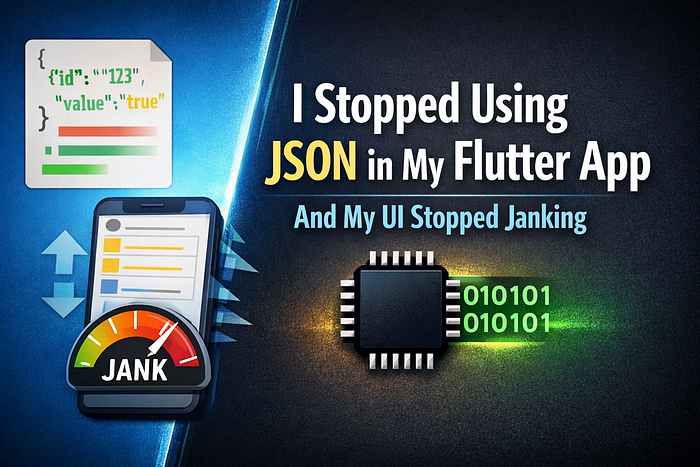

FLUTTER · PERFORMANCE · ARCHITECTURE · NETWORKING
I Read a Backend Blog — and Saw My Flutter App Differently
Last week, I read a blog about a backend engineer who improved an API endpoint 5× by changing exactly one thing:
They stopped using JSON.
No database rewrite. No caching layer. No new infrastructure.
Just a different serialization format.
At first, I shrugged. "That's backend stuff."
Then I looked at my Flutter app.
👉 If you're a Medium member, keep reading here — otherwise, use this free link to access the full article.
And realized something uncomfortable:
Flutter is often the worst possible place to pay the cost of JSON.
The Flutter Problem We Don't Talk About
In Flutter, when we say:
final data = jsonDecode(response.body);What we're really saying is
- Parse megabytes of text
- Allocate thousands of objects
- Run it all on the UI isolate
- Hope the device is powerful enough
On modern phones, this sometimes works. On mid-range Android devices, it shows up as:
- Dropped frames
- Scroll stutter after API calls
- "Why does this screen feel heavy?"
And we usually blame:
- Widgets
- State management
- Rebuilds
- Animations
Rarely the data format itself.
Why JSON Hurts Flutter More Than Backend
JSON has one big advantage: human readability.
But Flutter doesn't benefit from that.
Flutter cares about:
- CPU time
- Memory allocations
- Garbage collection
- UI thread availability
JSON is:
- Text-based
- Verbose
- Expensive to parse
- Allocation-heavy
A number like 199.99 becomes seven characters.
A boolean becomes "true" or "false".
Every field name repeats — again and again.
Now multiply that across:
- 10,000 transactions
- 20 fields per item
- Nested objects
You're not sending data — you're sending a novel.
The Real Bottleneck: Serialization, Not Network
This is where that backend blog clicked for me.
The author profiled their endpoint and found:
- Database: fast
- Business logic: fast
- Serialization + transfer: painfully slow
The same thing happens in Flutter — but on the client.
Even if your API responds quickly, Flutter still has to:
- Download a large payload
- Decode text into objects
- Allocate memory
- Free it later
All before your UI can breathe.
Enter Binary Serialization
Binary formats don't represent data as text.
They represent it as:
- Bytes
- Compact numbers
- Efficient field encodings
The result:
- Smaller payloads
- Faster parsing
- Less memory churn
- Smoother UI
Two formats matter most for Flutter today:
- MessagePack
- Protocol Buffers (Protobuf)
Let's break them down.
MessagePack: JSON's Faster, Smaller Cousin
MessagePack is best described as:
"JSON, but binary."
What MessagePack Is
- Language-agnostic
- Schema-less
- Supports Maps, Lists, Strings, Numbers
- Encodes common values in 1–2 bytes
Small integers often take one byte. Short strings require only one extra byte beyond the string itself.
Why MessagePack Fits Flutter So Well
- Works with existing REST APIs
- No schema files
- No code generation
- Minimal migration effort
If your backend already sends JSON objects, MessagePack is a drop-in replacement.
Flutter Experience
- Decode from
Uint8List - Much faster than
jsonDecode - Smaller memory footprint
- Less UI isolate blocking
When MessagePack Shines
- Large lists (feeds, transactions, logs)
- Offline sync payloads
- Internal APIs
- Rapidly evolving data models
Trade-offs
- Not human-readable
- Harder to debug in browser dev tools
- Slight overhead for tiny payloads
For Flutter apps with heavy data? It's often the highest ROI performance win.
Protocol Buffers (Protobuf): Structured, Typed, Industrial-Grade
Protocol Buffers are different.
They are not "JSON but faster." They are a full serialization system.
Protocol Buffers are a language-neutral, platform-neutral, extensible mechanism for serializing structured data.
What Protobuf Really Is
Protocol Buffers are a combination of:
- A definition language (
.protofiles) - A compiler that generates code
- Language-specific runtime libraries
- A compact binary wire format
You define your data once:
message Transaction {
  int64 id = 1;
  double amount = 2;
  string merchant = 3;
}=
Then generate:
- Dart models
- Server models
- Serialization logic
All from the same source of truth.
What Problems Protobuf Solves
Protocol Buffers are designed for:
- Typed, structured data
- Payloads up to a few MB
- Network traffic and long-term storage
Key advantages:
- Extremely compact binary format
- Very fast serialization / deserialization
- Backward and forward compatibility
- Safe schema evolution
You can:
- Add new fields
- Deprecate old ones
- Keep old clients working
This is why:
Protocol buffers are the most commonly-used data format at Google.
They power:
- Inter-service communication
- Mobile APIs
- Disk storage
- Internal tooling
Protobuf in Flutter: Powerful, but Opinionated
Pros
- Fastest parsing
- Smallest payloads
- Strong typing
- Compile-time safety
Cons
- Requires
.protofiles - Code generation step
- More upfront complexity
- Slower iteration during early product phases
Best Use Cases in Flutter
- Fintech
- Messaging
- Realtime sync
- Multi-client ecosystems
- Long-lived APIs
- Strict contracts between teams
If MessagePack is a scalpel, Protobuf is industrial machinery.
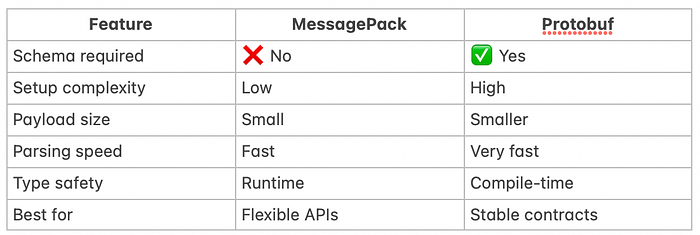
MessagePack vs Protobuf in Flutter
Why Flutter Benefits More Than Backend
Backend servers:
- Run on powerful CPUs
- Have dedicated threads
- Can hide latency with concurrency
Flutter:
- Runs on phones
- Has a single UI isolate
- Suffers immediately from blocking work
A 200ms parse on backend is invisible. A 200ms parse in Flutter is felt.
That's why this optimization often feels bigger on the client than the server.
The Quiet Architectural Lesson
For months, we optimize:
- Widgets
- Rebuilds
- State management
- Animations
But we rarely question the shape of the data.
JSON is comfortable. Comfort has a cost.
Binary serialization doesn't make your app "clever." It makes it honest about what machines actually need.
When You Should Consider Switching
- Payloads over 500 KB
- Lists with thousands of items
- Offline sync
- Realtime dashboards
- Performance complaints with no obvious UI cause
For tiny APIs? Stick with JSON.
For serious Flutter apps? Binary formats deserve a seat at the table.
Final Thought
The biggest performance wins often hide inside assumptions we never examine.
For me, that assumption was simple:
"APIs return JSON."
They don't have to.
And once I questioned that, my Flutter app stopped fighting me.
Read More: