

LEVEL UP YOUR PYTHON SKILLS WITH THESE
Hey Everyone, as we know python has a vast set of amazing libraries and many of them are really a game changer.
So, i have discovered these few game changer modern set of libraries that you should must know if you want to stay ahead in 2025.
1. Polars — The Blazing-Fast DataFrame Library
Polars is a blazingly fast DataFrame library written in Rust for manipulating structured data.

Why You Should Use It: This is 10x–100x faster than Pandas. It Supports lazy evaluation for large datasets and works natively with Apache Arrow
Docs : https://docs.pola.rs/
Installation
pip install polarsExample
This is simple example to create a DataFrame using Polars:
import polars as pl
import datetime as dt

df = pl.DataFrame(
    {
        "name": ["Alice Archer", "Ben Brown", "Chloe Cooper", "Daniel Donovan"],
        "birthdate": [
            dt.date(1997, 1, 10),
            dt.date(1985, 2, 15),
            dt.date(1983, 3, 22),
            dt.date(1981, 4, 30),
        ],
        "weight": [57.9, 72.5, 53.6, 83.1],  # (kg)
        "height": [1.56, 1.77, 1.65, 1.75],  # (m)
    }
)
print(df)
shape: (4, 4)
┌────────────────┬────────────┬────────┬────────┐
│ name           ┆ birthdate  ┆ weight ┆ height │
│ ---            ┆ ---        ┆ ---    ┆ ---    │
│ str            ┆ date       ┆ f64    ┆ f64    │
╞════════════════╪════════════╪════════╪════════╡
│ Alice Archer   ┆ 1997-01-10 ┆ 57.9   ┆ 1.56   │
│ Ben Brown      ┆ 1985-02-15 ┆ 72.5   ┆ 1.77   │
│ Chloe Cooper   ┆ 1983-03-22 ┆ 53.6   ┆ 1.65   │
│ Daniel Donovan ┆ 1981-04-30 ┆ 83.1   ┆ 1.75   │
└────────────────┴────────────┴────────┴────────┘
2. Ruff — The Fastest Python formatter & Linter
Ruff is a blazing-fast linter written in Rust, designed to replace Flake8, Black, and isort in one tool.
Why You Should Use It: This is 20x faster than Flake8, supports auto-fixing issues and works as a formatter and linter
Docs : https://docs.astral.sh/ruff/
Installation
pip install ruffExample
We can use uv to initialize a project:
uv init --lib demoThis command creates a Python project with the following structure:
demo
  ├── README.md
  ├── pyproject.toml
  └── src
      └── demo
          ├── __init__.py
          └── py.typed
We'll then replace the contents of src/demo/__init__.py with the following code:
from typing import Iterable

import os

def sum_even_numbers(numbers: Iterable[int]) -> int:
    """Given an iterable of integers, return the sum of all even numbers in the iterable."""
    return sum(
        num for num in numbers
        if num % 2 == 0
    )
Next, we'll add Ruff to our project:
uv add --dev ruffWe can then run the Ruff linter over our project via uv run ruff check:
$ uv run ruff check
src/numbers/__init__.py:3:8: F401 [*] `os` imported but unused
Found 1 error.
[*] 1 fixable with the `--fix` option.
we can resolve the issue automatically by running ruff check --fix:
$ uv run ruff check --fix
Found 1 error (1 fixed, 0 remaining).
3. PyScript — Run Python in the Browser
PyScript lets you write and execute Python code in the browser, similar to JavaScript.
Why You Should Use It: It enables Python-powered web apps, works directly in HTML and No backend needed!
Installation
We don't need to install PyScript, instead of this simply add a <script> and link tag, to your HTML document's <head>
<!-- PyScript CSS -->
<link rel="stylesheet" href="https://pyscript.net/releases/2025.2.4/core.css">
<!-- This script tag bootstraps PyScript -->
<script type="module" src="https://pyscript.net/releases/2025.2.4/core.js"></script>
Example
Create a simple .html file and user <py-script> tag write your python code.
<!doctype html>
<html>
    <head>
        <!-- Recommended meta tags -->
        <meta charset="UTF-8">
        <meta name="viewport" content="width=device-width,initial-scale=1.0">
        <!-- PyScript CSS -->
        <link rel="stylesheet" href="https://pyscript.net/releases/2025.2.4/core.css">
        <!-- This script tag bootstraps PyScript -->
        <script type="module" src="https://pyscript.net/releases/2025.2.4/core.js"></script>
    </head>
    <body>
        <!-- Now you can use <py-script> tag to write your python code inside-->
        <py-script>
          import sys
          from pyscript import display

          display(sys.version)
        </py-script>
    </body>
</html>
4. Pandera — Data Validation for Pandas
Pandera helps validate Pandas DataFrames and Series using schema-based validation.

Why You Should Use It: It Catch data errors before processing, works like Pydantic, but for Pandas and supports unit testing for data!
Installation
pip install panderaExample
import pandas as pd
import pandera as pa

# Data to validate
df = pd.DataFrame({
    "column1": [1, 4, 0, 10, 9],
    "column2": [-1.3, -1.4, -2.9, -10.1, -20.4],
    "column3": ["value_1", "value_2", "value_3", "value_2", "value_1"],
})

# Define schema
schema = pa.DataFrameSchema({
    "column1": pa.Column(int, checks=pa.Check.le(10)),
    "column2": pa.Column(float, checks=pa.Check.lt(-1.2)),
    "column3": pa.Column(str, checks=[
        pa.Check.str_startswith("value_"),
        # define custom checks as functions that take a series as input and
        # outputs a boolean or boolean Series
        pa.Check(lambda s: s.str.split("_", expand=True).shape[1] == 2)
    ]),
})

validated_df = schema(df)
print(validated_df)
column1  column2  column3
0        1     -1.3  value_1
1        4     -1.4  value_2
2        0     -2.9  value_3
3       10    -10.1  value_2
4        9    -20.4  value_1
5. JAX — Faster Deep Learning with Google's Magic
JAX is a high-performance library for machine learning and numerical computing, built by Google.
Why You Should Use It: It is faster than NumPy using GPU/TPU acceleration, Supports automatic differentiation and Used in Google's AI projects
Installation
- CPU-only (Linux/macOS/Windows)
pip install -U jax- GPU (NVIDIA, CUDA 12)
pip install -U "jax[cuda12]"- TPU (Google Cloud TPU VM)
pip install -U "jax[tpu]"Example
A simple example to create a numPy-style array.
import jax.numpy as jnp

def selu(x, alpha=1.67, lmbda=1.05):
  return lmbda * jnp.where(x > 0, x, alpha * jnp.exp(x) - alpha)

x = jnp.arange(5.0)
print(selu(x))
[0.        1.05      2.1       3.1499999 4.2      ]
6. Textual — Build TUI Apps in Python
Textual allows you to build modern Terminal UI apps (TUI) in Python with rich components.
Why You Should Use It: To Create beautiful terminal apps, Works with Rich for styling and No frontend experience needed!
Installation
pip install textualExample
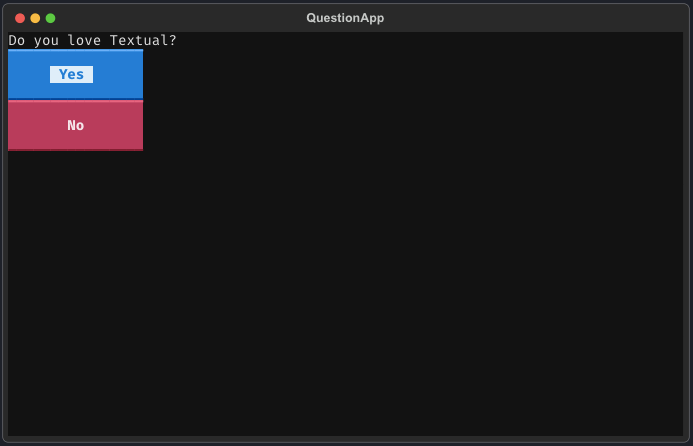
A simple example to create a TUI Apps.
from textual.app import App, ComposeResult
from textual.widgets import Label, Button


class QuestionApp(App[str]):
    def compose(self) -> ComposeResult:
        yield Label("Do you love Textual?")
        yield Button("Yes", id="yes", variant="primary")
        yield Button("No", id="no", variant="error")
    def on_button_pressed(self, event: Button.Pressed) -> None:
        self.exit(event.button.id)

if __name__ == "__main__":
    app = QuestionApp()
    reply = app.run()
    print(reply)
Running this app will give you this result:
7. LlamaIndex — Build Custom AI Assistants
LlamaIndex simplifies indexing and querying large datasets for LLM-powered applications.
Why You Should Use It: It is used for RAG (Retrieval-Augmented Generation), Works with OpenAI GPT models and Handles structured and unstructured data.
Docs : https://docs.llamaindex.ai/en/stable/#getting-started
Installation
pip install llama-indexExample
Let's start with a simple example using an agent that can perform basic multiplication by calling a tool. Create a file called starter.py:
- Set an environment variable called
OPENAI_API_KEYwith an OpenAI API key.
import asyncio
from llama_index.core.agent.workflow import AgentWorkflow
from llama_index.llms.openai import OpenAI


# Define a simple calculator tool
def multiply(a: float, b: float) -> float:
    """Useful for multiplying two numbers."""
    return a * b

# Create an agent workflow with our calculator tool
agent = AgentWorkflow.from_tools_or_functions(
    [multiply],
    llm=OpenAI(model="gpt-4o-mini"),
    system_prompt="You are a helpful assistant that can multiply two numbers.",
)

async def main():
    # Run the agent
    response = await agent.run("What is 1234 * 4567?")
    print(str(response))

# Run the agent
if __name__ == "__main__":
    asyncio.run(main())
The result of \( 1234 \times 4567 \) is \( 5,678,678 \).
8. Robyn — The Fastest Python Web Framework
Robyn is a high-performance alternative to Flask and FastAPI, optimized for multi-core processing.
Why You Should Use It: It 5x faster than FastAPI. It Supports async and multi-threading and Uses Rust for speed
Installation
pip install robynExample
Let's create simple project by using this command :
$ python -m robyn --createThis, would result in the following output.
$ python3 -m robyn --create
? Directory Path: .
? Need Docker? (Y/N) Y
? Please select project type (Mongo/Postgres/Sqlalchemy/Prisma):
❯ No DB
  Sqlite
  Postgres
  MongoDB
  SqlAlchemy
  Prisma
This will created a new application with the following structure.
├── src
│   ├── app.py
├── Dockerfile
You can now write a code in app.py file:
from robyn import Request

@app.get("/")
async def h(request: Request) -> str:
    return "Hello, world"
You can use this command to run the server :
python -m robyn app.py9. DuckDB — The Lightning-Fast In-Memory Database

DuckDB is an in-memory SQL database that is faster than SQLite for analytics.
Why You Should Use It: It is Blazing-fast for analytics, Works without a server and Easily integrates with Pandas & Polars
Docs : https://duckdb.org/docs/stable/clients/python/overview.html
Installation
pip install duckdb --upgradeExample
A simple example with pandas dataframe :
import duckdb
import pandas as pd

pandas_df = pd.DataFrame({"a": [42]})
duckdb.sql("SELECT * FROM pandas_df")
┌───────┐
│   a   │
│ int64 │
├───────┤
│    42 │
└───────┘
Final Thoughts
These 9 modern Python libraries will supercharge your workflow in 2025.
Which library is your favorite? Let me know in the comments! 🔥