


As a developer, I'm constantly seeking tools to enhance my productivity and streamline my workflow. The terminal, being my primary workspace, is where I spend countless hours coding and managing projects. Having the right command-line tools at your disposal can significantly impact your development efficiency and make routine tasks more manageable.
In this article, I'll share 7 powerful CLI (Command Line Interface) tools that have become essential to my daily development workflow. These tools have not only saved me valuable time but have also improved the quality of my work. Whether you're a seasoned developer or just getting started with command-line interfaces, these tools are worth adding to your toolkit.
The Fuck — Magnificent app which correct your previous console command
'The Fuck' has to be one of the most addicting command line tool once you start using it. Whenever you mis-type a command, just type fuck and it will automatically run the corrected version of the previous command!
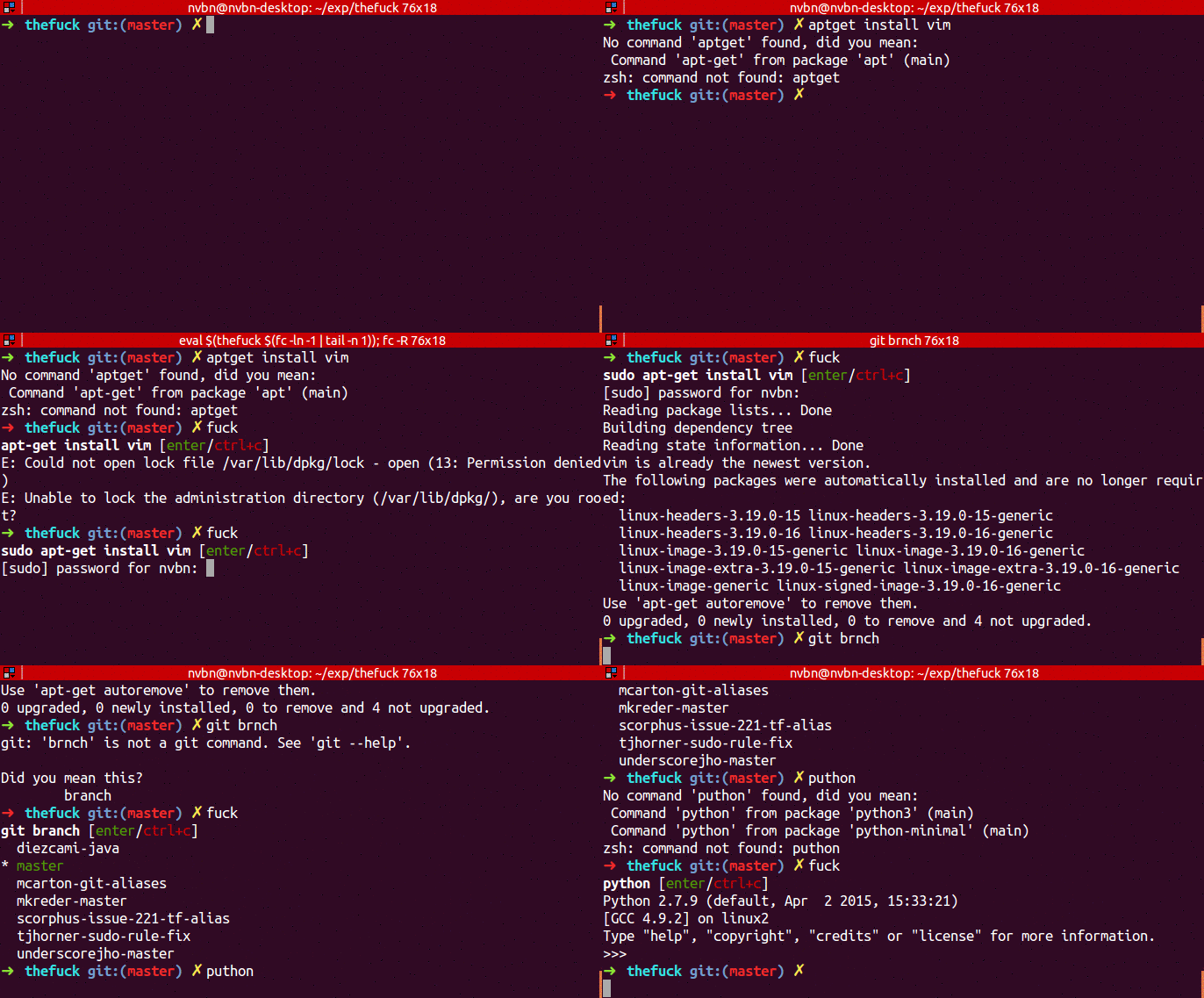
By default, the fuck command will ask you to confirm the corrected command to run. To run fixed commands without confirmation, use the --yeah option (or just -y for short, or --hard if you're especially frustrated).
fuck --yeah
fuck --hard
To fix command recursively until success, use the -r option.
fuck -rTo install this tool use the following commands ~
# macOS or Linux
brew install thefuck

# Ubuntu/Mint
sudo apt update
sudo apt install python3-dev python3-pip python3-setuptools
pip3 install thefuck --user

# On other systems, install using pip
pip install thefuck
scc — Code counter with complexity calculations and Constructive Cost Model (COCOMO) estimates
The scc command-line tool provides a detailed breakdown of lines of code for each programming language in a specific project.
In addition to basic metrics, it offers insights such as estimated development costs and code complexity. Known for its speed and accuracy, scc supports a wide range of programming languages, making it an invaluable tool for developers.
$ scc redis
───────────────────────────────────────────────────────────────────────────────
Language                 Files     Lines   Blanks  Comments     Code Complexity
───────────────────────────────────────────────────────────────────────────────
C                          296    180267    20367     31679   128221      32548
C Header                   215     32362     3624      6968    21770       1636
TCL                        143     28959     3130      1784    24045       2340
Shell                       44      1658      222       326     1110        187
Autoconf                    22     10871     1038      1326     8507        953
Lua                         20       525       68        70      387         65
Markdown                    16      2595      683         0     1912          0
Makefile                    11      1363      262       125      976         59
Ruby                        10       795       78        78      639        116
gitignore                   10       162       16         0      146          0
YAML                         6       711       46         8      657          0
HTML                         5      9658     2928        12     6718          0
C++                          4       286       48        14      224         31
License                      4       100       20         0       80          0
Plain Text                   3       185       26         0      159          0
CMake                        2       214       43         3      168          4
CSS                          2       107       16         0       91          0
Python                       2       219       12         6      201         34
Systemd                      2        80        6         0       74          0
BASH                         1       118       14         5       99         31
Batch                        1        28        2         0       26          3
C++ Header                   1         9        1         3        5          0
Extensible Styleshe…         1        10        0         0       10          0
Smarty Template              1        44        1         0       43          5
m4                           1       562      116        53      393          0
───────────────────────────────────────────────────────────────────────────────
Total                      823    271888    32767     42460   196661      38012
───────────────────────────────────────────────────────────────────────────────
Estimated Cost to Develop (organic) $6,918,301
Estimated Schedule Effort (organic) 28.682292 months
Estimated People Required (organic) 21.428982
───────────────────────────────────────────────────────────────────────────────
Processed 9425137 bytes, 9.425 megabytes (SI)
───────────────────────────────────────────────────────────────────────────────
To install this tool, use the following commands ~
# using Homebrew
brew install scc

# To install latest stable version using go, use the following command
go install github.com/boyter/scc/v3@latest
micro — A modern and intuitive terminal based text editor
For those who started with modern code editors like VSCode or Sublime Text, switching to command-line editors like Vim or Nano can be a daunting learning curve. For these users, Micro offers an ideal solution. It's a terminal-based text editor designed to be easy to use and highly intuitive, combining the power of the command line with a user-friendly experience.

Some of the amazing features offered by micro are as follows ~
- Support for multiple cursors
- Keybindings that are common to most of the modern IDEs
- Extremely good mouse support
- Simple autocompletion
- Syntax highlighting for over 130 languages
Since it is packaged into a single binary, installing it is as simple as running the following command ~
curl https://getmic.ro | bashYou can even use popular package manager to install micro.
# Using Homebrew on Mac
brew install micro

# Using snap on Linux
snal install micro --classic
eza — Modern alternative to ls
eza is a modern replacement for file listing program ls. It uses colours to distinguish file types and metadata. It knows about symlinks, extended attributes, and Git. And it's small, fast, and just one single binary.

Following instructions can get you to install the eza command line tool ~
# macOS
brew install eza

# With existing RUST environment setup
cargo install eza
For other installation steps, refer docs.
tldr — Collaborative cheatsheets for console commands
The tldr-pages project is a collection of community maintained help pages for command-line tools, that aims to be a simpler, more approachable complement to traditional man pages.

Following commands can be used to install tldr on your system
# Installation using npm
npm install -g tldr

# Installation using pip
pip install tldr

# Installation using brew
brew install tlrc
bat — A cat clone with wings
The bat tool is a clone of famous cat program with support for syntax highlighting and git integration.


Conveniently, using bat is similar to using the cat program.
~ sudo apt install bat  # Installation on Ubuntu

~ brew install bat # Installation on MacOS
A detailed guide for installing it on various distribution is provided here.
jq — Command Line JSON Processor
jq is a lightweight and flexible command-line JSON processor akin to sed,awk,grep, and friends for JSON data. It's written in portable C and has zero runtime dependencies, allowing you to easily slice, filter, map, and transform structured data.

There's also a jq playground that you can use to try it out, or formulate queries with live feedback.
The jq command line tool can be downloaded from their release page here.
Having the right tools at your fingertips can significantly boost your productivity and streamline your workflow. Each of these seven command-line tools addresses the limitations of their predecessors, offering solutions that better meet developers' needs.
That wraps up our exploration of these essential tools. If you found this article helpful, feel free to give it a clap and share your thoughts in the comments!
Some other articles that you may like are listed below!
